# Swagger 2.0 and OpenAPI 3.x parser/validator
[](https://github.com/readmeio/openapi-parser/actions)
[](https://apis.guru/browse-apis/)
[](https://www.npmjs.com/package/@readme/openapi-parser)
[](LICENSE)
[](https://github.com/readmeio/openapi-parser/actions)
[](https://apitools.dev/swagger-parser/online/)
## Features
- Parses Swagger specs in **JSON** or **YAML** format
- Validates against the [Swagger 2.0 schema](https://github.com/OAI/OpenAPI-Specification/blob/main/schemas/v2.0/schema.json), [OpenAPI 3.0 Schema](https://github.com/OAI/OpenAPI-Specification/blob/main/schemas/v3.0/schema.json), or [OpenAPI 3.1 Schema](https://github.com/OAI/OpenAPI-Specification/blob/main/schemas/v3.1/schema.json)
- [Resolves](https://apitools.dev/swagger-parser/docs/swagger-parser.html#resolveapi-options-callback) all `$ref` pointers, including external files and URLs
- Can [bundle](https://apitools.dev/swagger-parser/docs/swagger-parser.html#bundleapi-options-callback) all your Swagger files into a single file that only has _internal_ `$ref` pointers
- Can [dereference](https://apitools.dev/swagger-parser/docs/swagger-parser.html#dereferenceapi-options-callback) all `$ref` pointers, giving you a normal JavaScript object that's easy to work with
- **[Tested](https://github.com/readmeio/openapi-parser/actions)** in Node.js and all modern web browsers on Mac, Windows, and Linux
- Tested on **[over 1,500 real-world APIs](https://apis.guru/browse-apis/)** from Google, Microsoft, Facebook, Spotify, etc.
- Supports [circular references](https://apitools.dev/swagger-parser/docs/#circular-refs), nested references, back-references, and cross-references
- Maintains object reference equality — `$ref` pointers to the same value always resolve to the same object instance
## Example
```javascript
OpenAPIParser.validate(myAPI, (err, api) => {
if (err) {
console.error(err);
} else {
console.log('API name: %s, Version: %s', api.info.title, api.info.version);
}
});
```
Or use `async`/`await` or [Promise](http://javascriptplayground.com/blog/2015/02/promises/) syntax instead. The following example is the same as above:
```javascript
try {
let api = await OpenAPIParser.validate(myAPI);
console.log('API name: %s, Version: %s', api.info.title, api.info.version);
} catch (err) {
console.error(err);
}
```
For more detailed examples, please see the [API Documentation](https://apitools.dev/swagger-parser/docs/)
## Installation
Install using [npm](https://docs.npmjs.com/about-npm/):
```bash
npm install @readme/openapi-parser
```
## Usage
When using Swagger Parser in Node.js apps, you'll probably want to use **CommonJS** syntax:
```javascript
const OpenAPIParser = require('@readme/openapi-parser');
```
When using a transpiler such as [Babel](https://babeljs.io/) or [TypeScript](https://www.typescriptlang.org/), or a bundler such as [Webpack](https://webpack.js.org/) or [Rollup](https://rollupjs.org/), you can use **ECMAScript modules** syntax instead:
```javascript
import OpenAPIParser from '@readme/openapi-parser';
```
## Differences from `@apidevtools/swagger-parser`
`@apidevtools/swagger-parser` returns schema validation errors as the raw error stack from Ajv. For example:
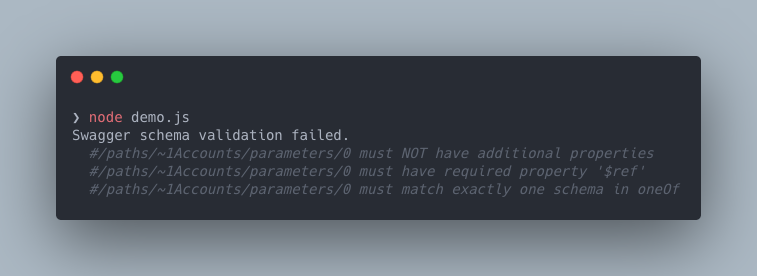 To reduce the amount of potentially unnecessary noise that these JSON pointer errors provide, `@readme/openapi-parser` utilizes [better-ajv-errors](https://www.npmjs.com/package/@readme/better-ajv-errors), along with some intelligent reduction logic, to only surface the errors that _actually_ matter.
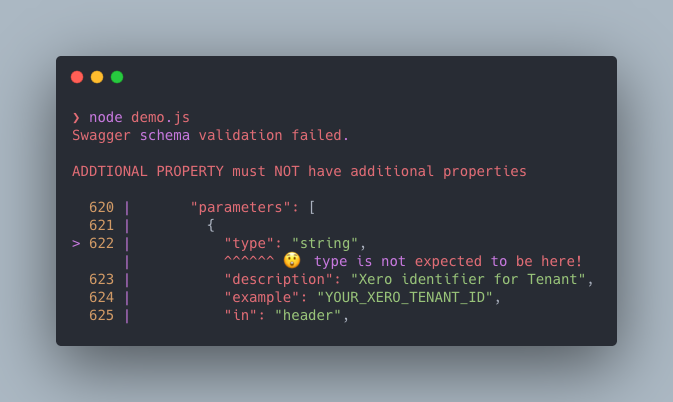 Additionally with these error reporting differences, this library ships with a `validation.colorizeErrors` option that will disable colorization within these prettified errors.
## Browser support
Swagger Parser supports recent versions of every major web browser. Older browsers may require [Babel](https://babeljs.io/) and/or [polyfills](https://babeljs.io/docs/en/next/babel-polyfill).
To use Swagger Parser in a browser, you'll need to use a bundling tool such as [Webpack](https://webpack.js.org/), [Rollup](https://rollupjs.org/), [Parcel](https://parceljs.org/), or [Browserify](http://browserify.org/). Some bundlers may require a bit of configuration, such as setting `browser: true` in [rollup-plugin-resolve](https://github.com/rollup/rollup-plugin-node-resolve).
## API Documentation
Full API documentation is available [right here](https://apitools.dev/swagger-parser/docs/)
Additionally with these error reporting differences, this library ships with a `validation.colorizeErrors` option that will disable colorization within these prettified errors.
## Browser support
Swagger Parser supports recent versions of every major web browser. Older browsers may require [Babel](https://babeljs.io/) and/or [polyfills](https://babeljs.io/docs/en/next/babel-polyfill).
To use Swagger Parser in a browser, you'll need to use a bundling tool such as [Webpack](https://webpack.js.org/), [Rollup](https://rollupjs.org/), [Parcel](https://parceljs.org/), or [Browserify](http://browserify.org/). Some bundlers may require a bit of configuration, such as setting `browser: true` in [rollup-plugin-resolve](https://github.com/rollup/rollup-plugin-node-resolve).
## API Documentation
Full API documentation is available [right here](https://apitools.dev/swagger-parser/docs/)